Delta Time
The content for this section was taken from Drew Coleman 1. If you want a more in-depth explanation about delta time, I highly recommend reading the article in its entirety!

Combining the previous two sections, we paint (and repaint) on a 2D canvas over and over again until the game stops. This repainting is what gives the illusion of things being moved on the screen. But, how fast is the repainting happening? This depends on the hardware your game is running on. You may have heard the terms “30 FPS” and “60 FPS” before. FPS stands for “frames per second”. A “frame” is a single painting of our animation.
For example, if our hardware runs at 3 frames per second, this means that in one second, we have 3 repaints.
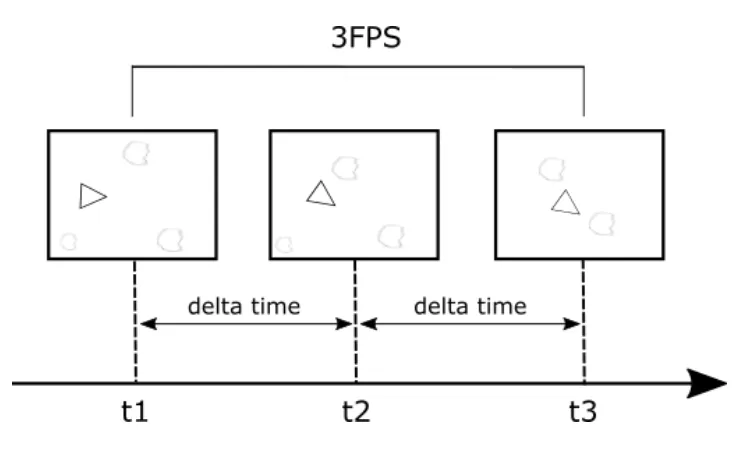
In other words, we have 1 repaint (roughly) every 0.33 seconds (1/3). Our delta time in this case is 0.33 seconds.
One of the problems that delta time solves is making a game feel the same on different hardware.
Why Frame Rate Dependency is Bad
Section titled “Why Frame Rate Dependency is Bad”A game that is frame rate dependent is one in which parts of the game is tied specifically to the number of frames the device the game is running on can draw.
Let’s look at one area in a game which shouldn’t be frame rate dependent, movement. When we are describing movement it’s in terms of the distance we travel over some specified time, like pixels per second (p/s), or kilometers per hour (kmph). If our game is frame rate dependent, then the speed at which our objects move is tied to the frame rate which means the speed of our game objects will be different on different hardware.
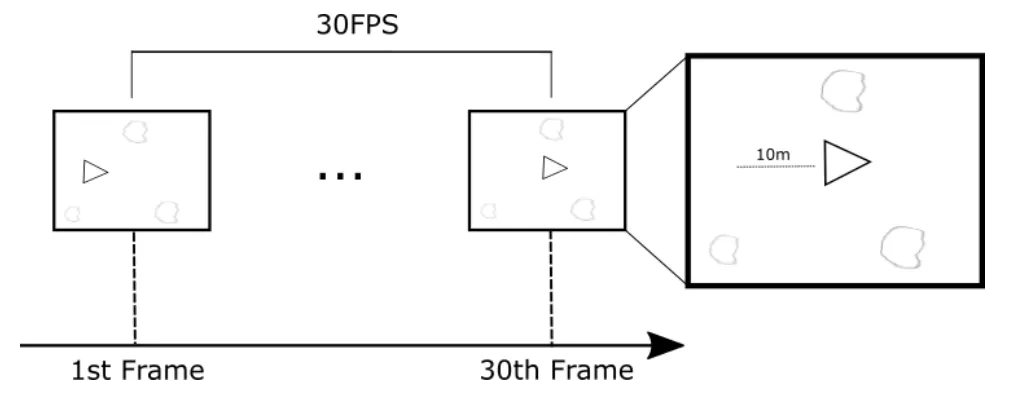
Assuming we have a spaceship and we want it to move at 10p/s, if we knew our game ran at 30fps on our device, then we would want it to move at 0.33333 pixels per frame.
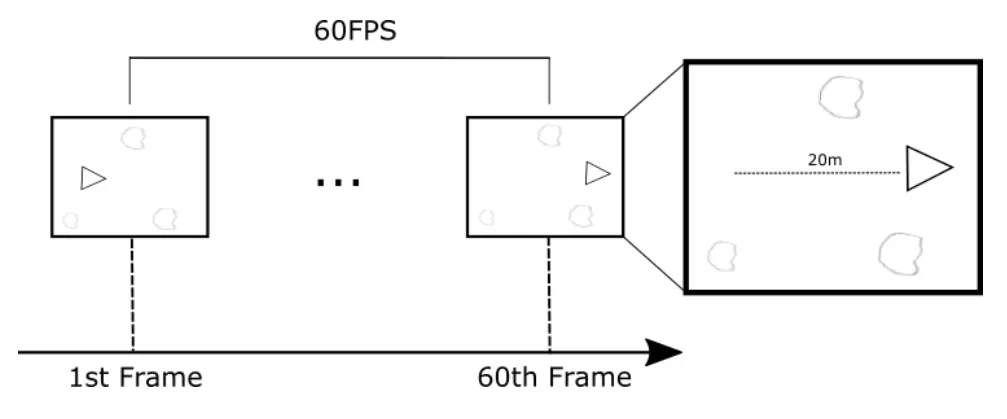
However, as soon as we run our game on a different device then the speed at which our ship moves will no longer be at 10p/s. On a device that can run our game at 60fps, we would have moved 20p/s. This is because we would be moving at 0.33333 pixels per frame, but the number of paints we’re doing in 1 second has doubled!
Here’s an actual example from the Nintendo Switch 2!
Because the Lasers are tied to the game’s refresh rate, the updated edition of Tears of the Kingdom now running at a perfect 60fps means that the lasers now fire at a far faster rate than before, leading to an unstoppable barrage of beams.
Delta Time to the Rescue
Section titled “Delta Time to the Rescue”TL;DR: Any time you change the position of something on the screen, scale it by delta time.
Delta time is the solution to solving our problem, freeing our code from the frame rate, making it frame rate independent.
Instead of moving an object by a fixed amount every frame, you multiply speed by delta time so movement depends on real-world elapsed time, not on how fast the computer renders frames.
Suppose a character wants to run at a speed of 60 px/s.
Without Delta Time
Section titled “Without Delta Time”If the game moves the character a flat 15 px on every single frame update:
Machine A (4 FPS)Runs 4 frames in 1 second -> 4 * 15 px = 60 pxMachine B (3 FPS)Runs 3 frames in 1 second -> 3 * 15 px = 45 pxMachine B runs visibly slower simply because its framerate is lower, giving Machine A an unfair speed advantage.
With Delta Time
Section titled “With Delta Time”Here, the desired speed is 60 px/s, and each machine calculates its elapsed time per frame: dt = 1/FPS
Machine A (4 FPS)dt = 1/4 = 0.25 s per frameMovement per frame = 60 px/s * 0.25 s = 15 pxTotal distance in 1 s = 4 * 15 px = 60 pxMachine B (3 FPS)dt = 1/3 ~= 0.333 s per frameMovement per frame = 60 px/s * 0.333 s = 20 pxTotal distance in 1 s = 3 * 20 px = 60 pxBoth characters travel the exact same distance in real time. Machine A takes 4 smaller, smoother steps (15 px each), while Machine B takes 3 larger steps (20 px each).
No matter how fast or slow the hardware is, our game will always behave the same - Hurray! 🎉