Assignment 5: Angry Birds
- 💯 Worth: 6%
- 📅 Due: See due date on Moodle.
- 🚫 Penalty: Late submissions lose 10% per day to a maximum of 3 days. Nothing is accepted after 3 days and a grade of 0% will be given.
🎯 Objectives
Section titled “🎯 Objectives”- Read and understand all of the Angry Birds tutorial lessons.
- Extend an existing codebase by reading its conventions and building new features that fit into them.
- Use a physics engine to move, push, and break things, and tune the numbers behind how a hit feels.
- Give each bird its ability through its own class, with abilities that last as states and instant ones as a single method.
- Create entities through a factory, and keep the HUD in sync with the Observer pattern.
- Give the player feedback through sound effects, animations, and visual effects.
🔨 Setup
Section titled “🔨 Setup”- Fork (do not download as a zip) the starter repository from GitHub. Make sure you use the link from Moodle to fork the proper repository for this assignment.
- Follow the environment setup instructions if you haven’t already done so from a previous assignment.
- Start Live Server in VSC by right-clicking on
index.htmland selecting Open with Live Server. This will open a new tab in your browser with the game running.
🔍 Context
Section titled “🔍 Context”To complete this assignment, you should read and understand all of the Angry Birds tutorial lessons, and be familiar with the following:
- Matter.js: Every bird, block, pig, and mound is a
GameEntitywrapped around a Matter body. PressQin game to toggle debug mode and see the bodies, with a panel that counts them. - Bird states: Every bird has Waiting, Aiming, Flying, and Dead states. Space or a click in flight calls
Bird.activate(), which plays the cloud and feathers, then callsuseAbility(). An ability that’s over in an instant goes inuseAbility(). An ability that lasts gets its own state, underBirdStateName.Ability. - Factories:
createBird()insrc/services/BirdFactory.jslooks up each bird’s class by its type, and any type without one is a plainBird. - Observer pattern:
Fortressnotifies its observers whenever a block or pig is destroyed, andEffectssubscribes to throw the shards. - Damage:
Breakable.getHitBy()turns a hit’s speed and mass into damage, against each block’stoughness. A bird’smaterialDamagescales its hits on the materials it’s good against.
Welcome to your sixth assignment! We’ve built the core of a physics puzzle in the style of Angry Birds, with a slingshot to pull back, a camera that follows the shot, and fortresses of wood, glass, and stone that come crashing down on the pigs. So far, though, only Red is ready to fly. Let’s bring in the rest of the flock and give the pigs something to worry about!
The Levels
Section titled “The Levels”The starter’s three levels are already laid out so that you can test every feature:
| Level | Name | What’s there |
|---|---|---|
| 1 | The hut | Two wood posts and a wood roof, with a pig inside, and three Red birds. |
| 2 | The house on the hill | Glass, wood, and stone around a pig, up on a mound, and three Red birds. |
| 3 | The twin huts | Two wood huts, a glass tower across their roofs, four pigs, and four Red birds. |
Level definitions live in src/config/levels.js. Each feature below gives a one-line change to a level so that you (and your graders) can test it. Each level’s birds array is the order the birds are loaded into the sling, so putting a bird first means it’s the first one you fire.
Build Your Own Levels (Optional)
Section titled “Build Your Own Levels (Optional)”The levels are already laid out in a way that you can test any feature you choose to implement, so you don’t have to make your own. However, the game comes with a level editor, and I encourage you to build something much cooler than three huts:
- Press
Ein game, or open the pause menu and click Edit, to edit the level you’re on. - Pick pieces from the palette and place them in the world. They snap to the grid, then to their neighbours, so towers start out touching. Every action is on the toolbar, along with its key.
- Press
Cto copy the level, then paste it over the matching entry insrc/config/levels.js, or add it to the end of the array as a new level.
New pig types you add to pigDefinitions show up in the editor’s palette on their own. A level that shows off the features you implemented makes life easier for your peer evaluators!
✅ Pick 3/5 Minor Features (30%)
Section titled “✅ Pick 3/5 Minor Features (30%)”Each feature’s table lists everything it’s graded on. Each row is worth 2 points: 2 if it works fully, 1 if it partially works, and 0 if it doesn’t work or wasn’t attempted. Only the first three minor and first two major features listed in your README are graded, so if you implement more than that, list the ones you want graded first. Additional deductions may be given for other issues, which will be detailed in comments.
Damage is always tested with a full pull, with the bird pulled all the way back and aimed so it hits the block flat on. A hit on a tower also brings down everything resting on it, so test damage on a test block: a block on its own on the ground, far enough from anything else that a bird rolling on can’t reach it. Add one to any level’s blocks, changing its type and x as you need:
{ type: "wood", size: "brick", x: 1500, y: 790.5, angle: 0 },Turn on debug mode to read the block’s health before and after the hit. That’s how each damage row is graded.
💙 The Blues
Section titled “💙 The Blues”In flight, the Blues split into three birds to rain down on the fortress. They’re small and light, but they go straight through glass.
To test it, put the Blues first in the house on the hill’s birds in src/config/levels.js:
birds: ["blues", "red", "red"],| Requirement | How it’s tested |
|---|---|
Space or a click in flight splits the bird into three and plays ability-split. |
Fire the Blues and press Space, then again and click. |
| The two new birds keep the first bird’s speed and fan out above and below its path. | Split the Blues on the way up, at the top of the arc, and on the way down. |
| The split only happens once, and none of the three can split again. | Press Space several times after splitting. |
| Each of the three leaves its own trail, and the next bird only loads once all three are finished. | Split the Blues so that the three land at different times. |
| A Blue breaks a glass block in one hit, takes 1 of a wood block’s 3 health, and does nothing to stone. | In debug mode, hit a glass, a wood, and a stone test block with one Blue each. |
💛 Chuck
Section titled “💛 Chuck”In flight, Chuck bursts forward at the fortress, and he’s strong against wood.
To test it, put Chuck first in the hut’s birds in src/config/levels.js:
birds: ["chuck", "red", "red"],| Requirement | How it’s tested |
|---|---|
Space or a click in flight gives Chuck a sudden burst of speed and plays ability-boost. |
Fire Chuck and press Space, then again and click. |
| The burst goes the way he’s flying, but always angled down, toward the fortress and not over it. | Boost Chuck on the way up and on the way down. |
| The burst only happens once per flight. | Press Space several times in one flight. |
| Chuck breaks a wood block in one hit, where Red only cracks it. | In debug mode, hit a wood test block with Chuck, then another with Red. |
| A boosted Chuck chips stone, where an unboosted Chuck does nothing to it. | In debug mode, hit a stone test block with and without the boost. |
🤎 Terence
Section titled “🤎 Terence”A big, heavy bird with no ability at all. He doesn’t need one.
To test it, put Terence first in the house on the hill’s birds in src/config/levels.js:
birds: ["terence", "red", "red"],| Requirement | How it’s tested |
|---|---|
| Terence loads into the sling with his own frames, and plays his own select, flying, and collision sounds. | Fire Terence into the house on the hill. |
| His body is a circle about twice Red’s size that matches his art. | Toggle debug mode and compare Terence with Red. |
| He has no ability, and shows his hurt frame after his first hit. | Press Space in flight, then hit something. |
| One hit from Terence takes 2 of a stone block’s 4 health, where one from Red does nothing. | In debug mode, hit a stone test block with Red, then with Terence. |
| Only Terence’s hits count his extra weight, and every other bird and block does the same damage as before. | In debug mode, hit a wood test block with Red before and after adding maxHitMass, and check it loses the same health. |
⭐ Score & Stars
Section titled “⭐ Score & Stars”Points for everything the player destroys, a bonus for every bird they didn’t need, and up to three stars for a good score.
To test it, play any level. Give each level star scores in src/config/levels.js, for 1, 2, and 3 stars, each one a score that level can reach. These work for the hut:
stars: [10000, 18000, 26000],| Requirement | How it’s tested |
|---|---|
| Destroying a block or a pig adds its points to a score in the HUD, with different points for each type, updated through the Observer pattern. | Destroy each material and a pig, and watch the HUD. |
| The points pop up where each block or pig was destroyed, white for blocks and green for pigs. | Destroy blocks and pigs. |
| Once the last pig is gone, the camera goes back to the sling and each unused bird adds 10,000 points, one at a time, with a popup in its own colour, before Victory. | Win a level with birds left over, including one waiting in the sling. |
Victory shows the star placeholder, and fills in one star at a time with star-collect for each star score the level’s score reached. |
Win levels with low and high scores. |
| Each level’s best score is shown under the score, and it’s kept when the page reloads. | Win a level, reload the page, and play it again. |
🐷 Pig Roster
Section titled “🐷 Pig Roster”The pigs bring in reinforcements, with the Corporal in his helmet, the Foreman, and the King himself.
Each pig’s damage frames and smiling frames, with the health that shows each one:
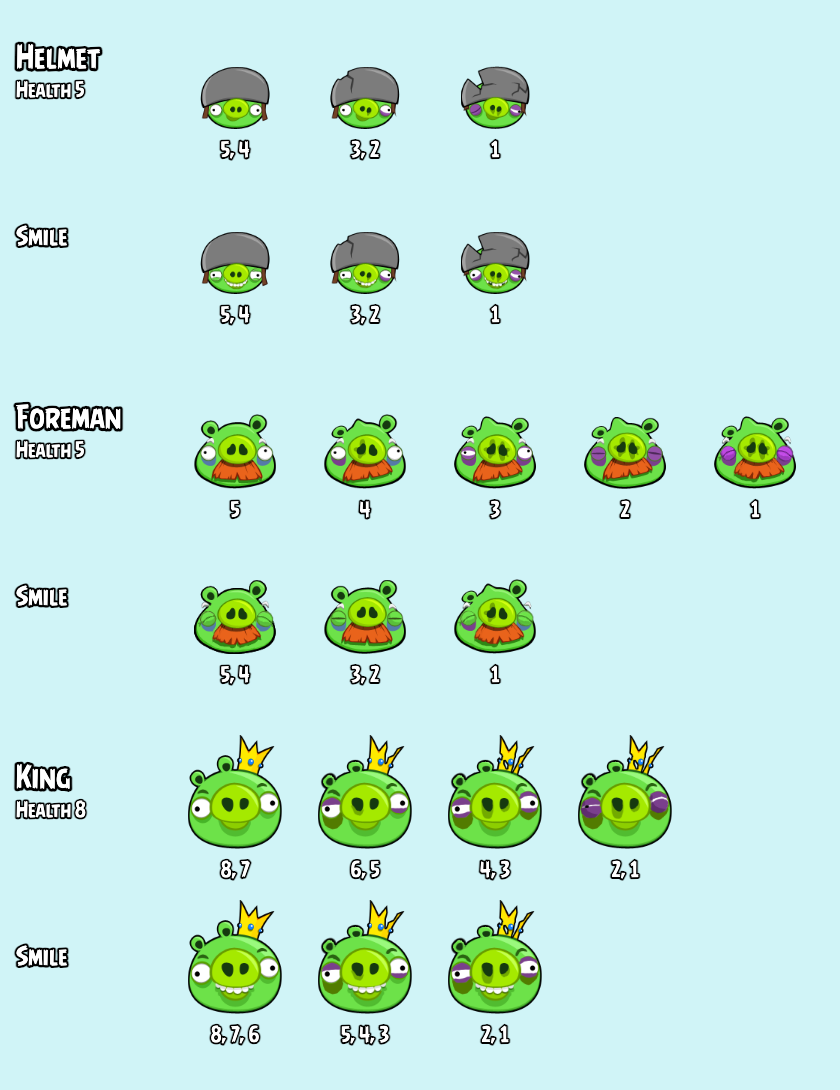
To test it, replace the hut’s pig with each new pig in turn in src/config/levels.js, then put the King beside the hut:
pigs: [{ type: "helmet", x: 2250, y: 787 }],pigs: [{ type: "foreman", x: 2250, y: 786 }],pigs: [{ type: "regular", x: 2250, y: 792 }, { type: "king", x: 2650, y: 780 }],| Requirement | How it’s tested |
|---|---|
Pigs are made by a PigFactory from the type in the level’s config, and types with no class of their own are plain pigs. |
Read src/services/PigFactory.js and where Level uses it. |
| The helmet pig and the Foreman each have their own frames and take several hits, and the helmet cracks a bit more with each stage but never comes off. | In debug mode, hit the helmet pig and the Foreman until they’re destroyed. |
| The King has his own frames, takes more hits than any other pig, and hops every few seconds. | Watch the King, then in debug mode hit him until he’s destroyed. |
| Every pig’s damage frames are spread across its health, so each stage shows before the pig is destroyed. | In debug mode, count the hits each pig takes, and the frames it shows. |
| On Game Over, every surviving pig swaps to a smiling frame that matches its damage. | Lose a level with damaged and undamaged pigs still alive. |
✅ Pick 2/3 Major Features (60%)
Section titled “✅ Pick 2/3 Major Features (60%)”💥 How a Blast Works
Section titled “💥 How a Blast Works”Matilda and Bomb both blow things up, so here’s how a blast works before you start on either.
Nothing flies out of a blast. It goes through every body in the world once, with Composite.allBodies(world), and works out how hard to push and hurt each one from how far it is from the centre.
Drag the green centre around the hut, or move it with the arrow keys, and click a body or press next body to see its numbers worked out under the screen. The arrows show how hard the blast would push each body in range, and blast() sets it off. Move each slider to see which numbers it changes. bird sets the sliders to the egg’s or Bomb’s numbers, and turning × mass off shows why the push is multiplied by the body’s mass.
For each body:
- How far away is it?
dxanddyare the body’s position minus the centre, and the distance isMath.hypot(dx, dy). Skip it if itsentityisn’t aBreakable, or if it’sradiusor more away. Nothing physical travels out from the centre, so walls don’t block a blast. - How strong is the blast there?
strength = 1 - distance / radiusis 1 at the centre and falls to 0 at the edge. - Which way does it go?
dx / distanceanddy / distancepoint straight away from the centre, one pixel long. Divide byMath.max(distance, 1), so a body right on the centre doesn’t divide by 0. - How hard is the push? Multiply that direction by
force * strength * body.mass, and give it toBody.applyForce(body, body.position, push). Matter divides a force by the body’s mass to get its speed, so multiplying by the mass first sends a heavy stone block flying as far as a light glass one. - How much damage? Call
takeDamage(Math.ceil(damage * strength)).Math.ceil()rounds up, so anything in range loses at least 1 health. A blast isn’t a hit, so it skipsgetHitBy()and the block’s toughness. A regular pig has 1 health, so any blast that reaches it kills it, even when the walls around it survive.
Matter multiplies a force by the square of each step’s length in milliseconds, so its forces are tiny numbers. That’s why the force values in the tips look so small.
🤍 Matilda
Section titled “🤍 Matilda”In flight, Matilda throws an explosive egg, and the recoil sends her spinning the opposite way.
In the real game, Matilda can only drop her egg straight down. Her egg’s blast works just like Bomb’s, so we’ve let her aim it with the mouse to give her something of her own. Bomb is about timing, and Matilda is about aiming.
The dotted lines in the video show where the egg would go, toward the cursor, and where Matilda would go, the opposite way. They’re there to help you see the aim, and you don’t need to draw them.
To test it, put Matilda first in the hut’s birds in src/config/levels.js:
birds: ["matilda", "red", "red"],| Requirement | How it’s tested |
|---|---|
Space or a click plays her laying animation, then throws the egg and plays ability-egg. |
Fire Matilda and press Space. |
| A click throws the egg toward the cursor, and Space drops it straight down. | Throw the egg with a click at several angles, then with Space. |
| Throwing the egg sends Matilda the opposite way, spinning until she hits something. | Throw the egg forward, backward, and down. |
The egg explodes on the first thing it touches, with egg-explosion, an explosion, and a small screen shake. |
Throw the egg at a block, a pig, and the ground. |
| The blast pushes and damages every block and pig in range, more near its centre, even through walls. | In debug mode, throw the egg beside the hut, and onto its roof. |
| Matilda breaks wood in one hit, where Red only cracks it. | In debug mode, hit a wood test block with Matilda, then another with Red. |
| The egg’s blast takes 3 of a stone block’s 4 health up close. | In debug mode, drop the egg onto a stone test block. |
| She throws one egg per flight, and the next bird only loads once the egg has exploded or left the world. | Press Space several times, and throw an egg off the edge of the world. |
🖤 Bomb
Section titled “🖤 Bomb”Bomb lights his fuse, keeps flying, and blows up everything around him. He’s strong against stone.
To test it, put Bomb first in the house on the hill’s birds in src/config/levels.js:
birds: ["bomb", "red", "red"],| Requirement | How it’s tested |
|---|---|
| Space or a click in flight lights his fuse, and Bomb swells through his fuse animation while he keeps moving. | Fire Bomb and press Space high in the air. |
| Hitting a block or a pig lights the fuse too, but skimming the ground or a mound doesn’t. | Fire Bomb into the house without pressing Space, then low along the ground. |
| If his flight ends before the fuse is lit, by stopping or rolling for too long, it lights then. | Fire Bomb short, so he lands and rolls without hitting anything. |
| The fuse only lights once, however many times Space is pressed or he’s hit. | Press Space, then let him hit the fortress while the fuse burns. |
At the end of the fuse, he blows up with bomb-explosion, an explosion, and a small screen shake, and he’s gone. |
Light the fuse and watch. |
| The blast pushes and damages every block and pig in range, more near its centre, even through walls. | In debug mode, blow Bomb up beside the house, and on top of it. |
| The blast breaks stone up close, and a hit from Bomb himself chips stone, where Red does nothing to it. | In debug mode, blow Bomb up against a stone test block, and hit another with Bomb and with Red. |
| If he leaves the world with his fuse lit, he doesn’t blow up, and the next bird loads. | Light the fuse on a shot that flies off the edge of the world. |
In flight, Hal curves back like a boomerang, so he can hit a fortress from behind. He’s strong against wood and glass.
To test it, put Hal first in the hut’s birds in src/config/levels.js:
birds: ["hal", "red", "red"],| Requirement | How it’s tested |
|---|---|
Space or a click in flight plays ability-boomerang and opens Hal’s beak wide. |
Fire Hal and press Space. |
| Hal turns in a smooth arc, rising as he goes, and comes back the way he came. | Turn Hal at the top of his arc and on the way down. |
| The turn has the same shape however hard he was launched, so he always comes back at a share of his own speed. | Turn Hal after a short pull and after a full pull. |
| Hal spins in flight, faster after the turn, until he hits something. | Watch Hal before and after turning him, and after a hit. |
| Turned after flying past the hut, Hal can come back and hit it from behind. | Overshoot the hut, then turn Hal. |
| The turn only happens once per flight. | Press Space several times in one flight. |
| Hal breaks wood and glass in one hit. | In debug mode, hit a wood and a glass test block with Hal. |
| If the turn takes him off the edge of the world, his flight ends and the next bird loads. | Turn Hal early on a shot near the sling. |
📝 Assignment Policies (10%)
Section titled “📝 Assignment Policies (10%)”Read the assignment policies and make sure you include a proper .devlog.md file (5%). There will be a peer evaluation component (5%) to this assignment as well as a chance to be randomly selected to do a code walkthrough at my discretion.
📥 Submission
Section titled “📥 Submission”- Inside README.md, list the 3 minor and 2 major features you want graded, in that order, then any known bugs to look out for, anything you want your peer evaluators to know, then do your final
git pushto GitHub. - Go to Gradescope, click the link for this assignment, select the correct repository and branch from the dropdown menus, and click
Upload. - Assess your peers starting the day after the three day late submission deadline.