Match-3-6 is the “juice” update. It adds an animated title screen, animated level transitions, state-specific music, particles, and the rule that a player may swap only orthogonally adjacent tiles.
Juice
Game juice is informal game-development language for feedback that makes an action feel responsive, clear, and satisfying. It does not usually change the game’s rules: a tile match is still a match whether or not it has particles, sound, a screen transition, or animation. Juice makes the result easier to notice and more enjoyable to repeat.
Common kinds of juice include:
- motion, such as tweens, easing, and screen or UI transitions;
- visual feedback, such as particles, flashes, highlights, and animated text;
- audio feedback, such as distinct music per screen and varied sound effects; and
- small timing details, such as a brief pause before a new board appears.
Title Screen
main.js registers all four states and begins at TitleScreenState.
game.addState(StateName.GameOver, GameOverState);game.addState(StateName.LevelTransition, LevelTransitionState);game.addState(StateName.Play, PlayState);game.addState(StateName.TitleScreen, TitleScreenState);
game.services.stateMachine.change(StateName.TitleScreen);
TitleScreenState creates a display-only board and scrolling Scene in its constructor. Each time it enters, it resets the fade, initializes the board, starts automatic board swaps, starts the title music, and starts a timer that rotates the title colours.
this.autoSwapTask = this.board.autoSwap();this.game.sounds.play(SoundName.TitleMusic);this.startColourTimer();The colour timer moves the first colour to the end of the array every quarter second. Drawing the letters with the shifted colours makes the title appear animated.
this.colourTask = this.game.timer.every(0.25, () => { this.colours = this.colours.slice(1).concat(this.colours.slice(0, 1));});Menu Fade
The title menu accepts WASD or arrow keys to switch between Start and Quit. Selecting Start sets inTransition, fades a white overlay to full opacity, and then changes to LevelTransitionState.
this.inTransition = true;await this.game.timer.tweenAsync(this, { transitionAlpha: 1 }, 1);
this.game.stateMachine.change(StateName.LevelTransition, { level: 1, scene: this.scene,});Animate Level Changes
LevelTransitionState owns the handoff between levels. It receives the level, cumulative score, shared scene, and, after a completed level, the outgoing board and UI. It can therefore move the old level away before it builds the new one.
The outgoing board slides right while the UI slides left and the screen fades to white. Promise.all() runs those independent tweens concurrently.
await Promise.all([ timer.tweenAsync(this, { transitionAlpha: 1 }, 1, Easing.easeInQuad), timer.tweenAsync(board, { x: CANVAS_WIDTH }, 1, Easing.easeInQuad), timer.tweenAsync(userInterface, { x: -275 }, 1, Easing.easeInQuad),]);The transition state then creates the matchless board, PlayStats, and UserInterface for the next level. It slides them in, displays an animated level label, starts PlayMusic, and changes into PlayState with the constructed objects as props.
Music and Particles
The asset manifest defines looping TitleMusic and PlayMusic. TitleScreenState owns title music; LevelTransitionState starts play music; and PlayState.exit() pauses play music. Assigning that responsibility to states makes the active track follow the active screen.
When a matched tile is removed, Board.spawnMatchParticles() uses the tile colour to create short-lived particles with random directions and speeds. The shared ParticleSystem updates and renders them as part of Game’s normal loop.
Restrict Swaps
Earlier lessons allow any two tiles to swap. PlayState.getTileDistance() now calculates their Manhattan distance: the horizontal difference plus the vertical difference.
getTileDistance(tile1, tile2) { return ( Math.abs(tile1.boardX - tile2.boardX) + Math.abs(tile1.boardY - tile2.boardY) );}Orthogonally adjacent tiles have a distance of 1. The same tile has distance 0; a diagonal tile has distance 2. When the selected target is farther than one step away, the game plays an error sound and clears the selection instead of swapping.
if (this.getTileDistance(this.selectedTile, highlightedTile) > 1) { sounds.play(SoundName.Error); this.selectedTile = undefined; return;}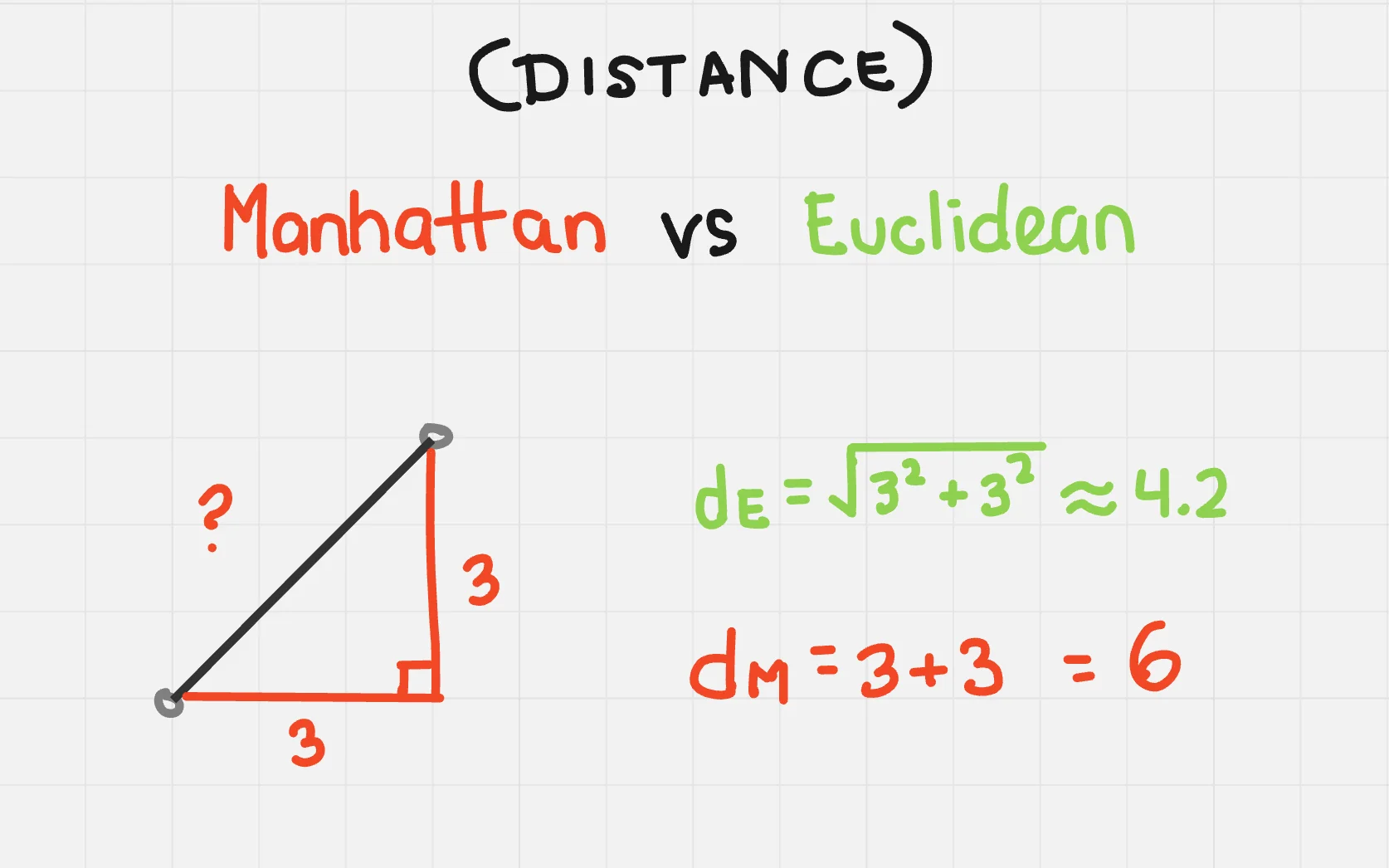
Resolve Gameplay Safely
isResolvingMatches now blocks both player selection and win/loss checks while a swap cascade is resolving. A successful swap sets the flag, resolves all match removal and replacement work, and clears it in finally.
this.isResolvingMatches = true;
try {  await this.calculateMatches();} finally {  this.isResolvingMatches = false;}
This prevents a score goal or timeout from changing state while score, falling-tile, and particle effects from the current board are still active.