This lesson was updated. Reset to the new version?
This browser isn't keeping your edits, so they're lost when you leave the page.
Pokémon-2 replaces your town with the course’s own Pallet Town and Route 1, in assets/maps/overworld.tmj, and adds a sign and a person to talk to, an NPC (non-player character). Both open a textbox over the map, so two screens are on the canvas at once.
The State Stack
Pokémon has screens that sit on top of each other, such as a textbox over the map or a menu over a battle. game.stateStack, from lib/StateStack.js, keeps them in a stack. push() puts a state on top, and pop() takes the top one off:
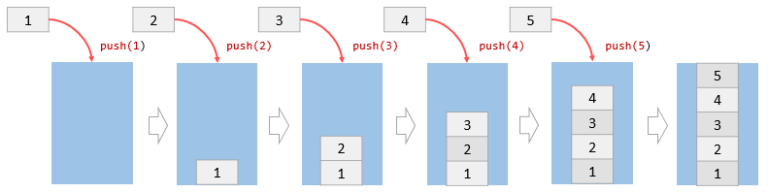
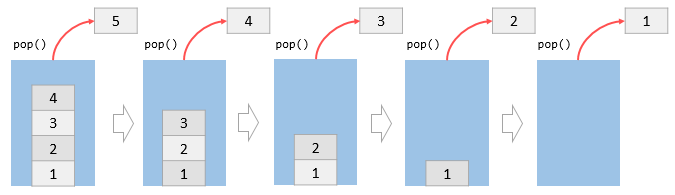
Each frame, only the top state updates, so only it reads the keyboard. Every state renders, from the bottom up, so the map stays on screen under the textbox:
77update(dt) {78  this.top()?.update(dt);79}80
81/**82 * Renders every state from the bottom up.83 *84 * @param {CanvasRenderingContext2D} context Rendering context.85 * @returns {void}86 */87render(context) {88  this.states.forEach((state) => {89    state.render(context);90  });91}
Pushing a state doesn’t exit the one under it, so PlayState keeps its map and player as they were.
Overlays
A textbox opens, waits to be read, and closes itself. show() in lib/StateStack.js does that for any overlay. It pushes an OverlayState, waits until the overlay calls its own close(), then pops it:
56async show(state, props) {57  /** @type {Promise<Result>} */58  const closed = new Promise((resolve) => {59    state.close = resolve;60  });61
62  this.push(state, props);63
64  const result = await closed;65
66  this.pop();67
68  return result;69}
new Promise() hands over a resolve function that finishes the promise when it’s called. show() stores it as the overlay’s close, so this.close() in the overlay ends the await. The code that shows an overlay never pushes or pops it.
DialogueState in src/states/DialogueState.js wraps this in a static method, one that belongs to the class rather than to an object:
23static show(game, text, placement = Panel.BOTTOM_DIALOGUE) {24 return game.stateStack.show(new DialogueState(game), { text, placement });25}await DialogueState.show(game, "Hello!") opens a textbox and carries on once the player has read it. Step through show() while the player talks to the NPC, with the stack drawn beside the screen:
The Textbox
DialogueState.enter() creates a Textbox from src/user-interface/elements/Textbox.js, a Panel with text on it:
- Pagination:
getLines()wraps the text to fit the panel, andcreatePages()groups the lines into pages. A\nstarts a new line. - Typing: each
update()addsdt * TYPING_SPEEDtotypedCharacters, andrenderText()draws only that many characters. - Turning pages: Enter or Space finishes a page that’s still typing, or calls
next(). On the last page,next()setsisClosedto true.
The textbox never closes itself. The state that owns it checks isClosed.
Nine-slice Borders
battle-ui.png has each panel’s border once, as a 24 × 24 square. renderNineSlice() in src/user-interface/drawing.js cuts it into a 3 × 3 grid of 8 × 8 pieces and draws each one once, scaled by drawImage() to fill its space. The corners keep their size, the edges stretch along their length, and the middle stretches both ways, so the rounded corners stay sharp at any size. Change the panel’s size to see where each piece goes:
People and Signs
NPC in src/objects/NPC.js is a GameEntity, like the player. npcs in src/config/characters.js lists each map’s NPCs with their position, direction, sprites, and line:
38export const npcs = {39 overworld: [40 {41 position: { x: 11, y: 50 },42 direction: Direction.Down,43 firstSprite: { x: 9, y: 217 },44 totalSprites: 12,45 dialogue:46 "Welcome to Pallet Town! It's quiet here. Nothing lives in the tall grass... yet.",47 },48 ],49};GameMap creates them, and isTileOpen() now checks isNPCAt(), so the player bumps into people. renderEntities() sorts the NPCs and the player by y, as Zelda did, so whoever is lower is drawn in front. signs in src/config/signs.js lists each sign’s tile and text, because the sign itself is already in the map’s art.
Pressing Space in PlayerIdleState in src/states/player/PlayerIdleState.js checks the tile the player faces for an NPC, then a sign:
58if (input.isKeyPressed(Input.KEYS.SPACE)) {59  const npc = player.map.getInteractableNPC();60
61  if (npc) {62    void npc.talk(player);63
64    return;65  }66
67  const sign = player.map.getReadableSign();68
69  if (sign) {70    void DialogueState.show(this.game, sign.text);71
72    return;73  }74}
Talking only works from PlayerIdleState, because a step’s tweens are on game.timer and would keep running under the textbox. NPC.talk() turns the NPC towards the player with faceTowards(), then awaits DialogueState.show() with its line. Step through it with the player facing the NPC, a sign, or nothing:
Read the sign
Press Space facing a sign or the NPC, and an empty textbox opens and never closes, because update() in src/states/DialogueState.js is empty. Reload the preview to get out of it.
Fill in update():
- Call
this.textbox?.update(dt)on every frame, so the textbox types and turns its pages. - Then, once
this.textbox?.isClosedis true, callthis.close().
The ?. is there because textbox is only set in enter(). Once it works, the text types out, Enter turns the page, and Enter on the last page closes the box.
If the box opens empty, the textbox isn’t being updated. Its update runs on every frame, so put it first in update(), outside any if.
If the text types out and the pages turn but the box never goes away, update() never calls this.close(). Check this.textbox?.isClosed in an if after the textbox update.
Replace the TODO with:
this.textbox?.update(dt);
if (this.textbox?.isClosed) {  this.close();}