Breakout-1 takes advantage of “sprite sheets” in order to render a paddle sprite during PlayState.
What is a Sprite Sheet?
A Sprite Sheet is an image containing smaller images (i.e. “sprites”) within itself. A sprite sheet can be split into “sprites”, that is, rectangular sections of itself (each encapsulating a single sprite), so that instead of having multiple image files in our project for each sprite, we can more efficiently use a single file that we section out into sprites when rendering a particular sprite.
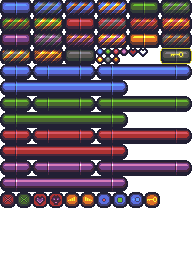
When an artist creates a sprite sheet, they usually do so with a tile size in mind. This tile size is a pixel value that denotes the width and height of one tile in the sheet. Here’s the same sprite sheet broken up into tiles:
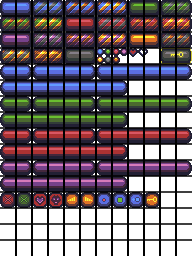
The tile size of this particular sheet is 16 pixels. Meaning, each square above is 16 pixels wide by 16 pixels high. We can use this value to extract each individual sprite from the sheet in our code.
Important Functions
SpriteManager.generatePaddleSprites()- This function extracts the paddle sprites from the main sprite sheet.
Sprite::render(x, y)- The sprite object contains the
xandycoordinates of where the sprite is located in the sprite sheet image. Thexandythat we pass to this render function is the location we want to draw the sprite on the canvas.
- The sprite object contains the
Important Code
TILE_SIZEis a constant declared inglobals.jsthat defines the size of one tile in the sprite sheet. In this case, one “tile” is 16 pixels wide and 16 pixels tall.Paddle.js- Contains all the updating and rendering logic for our paddle.
PlayState.jsupdate()allows the user to pause the game and move the paddle.render()calls the paddle’s ownrender()method and also displays paused text ifthis.pausedis true.